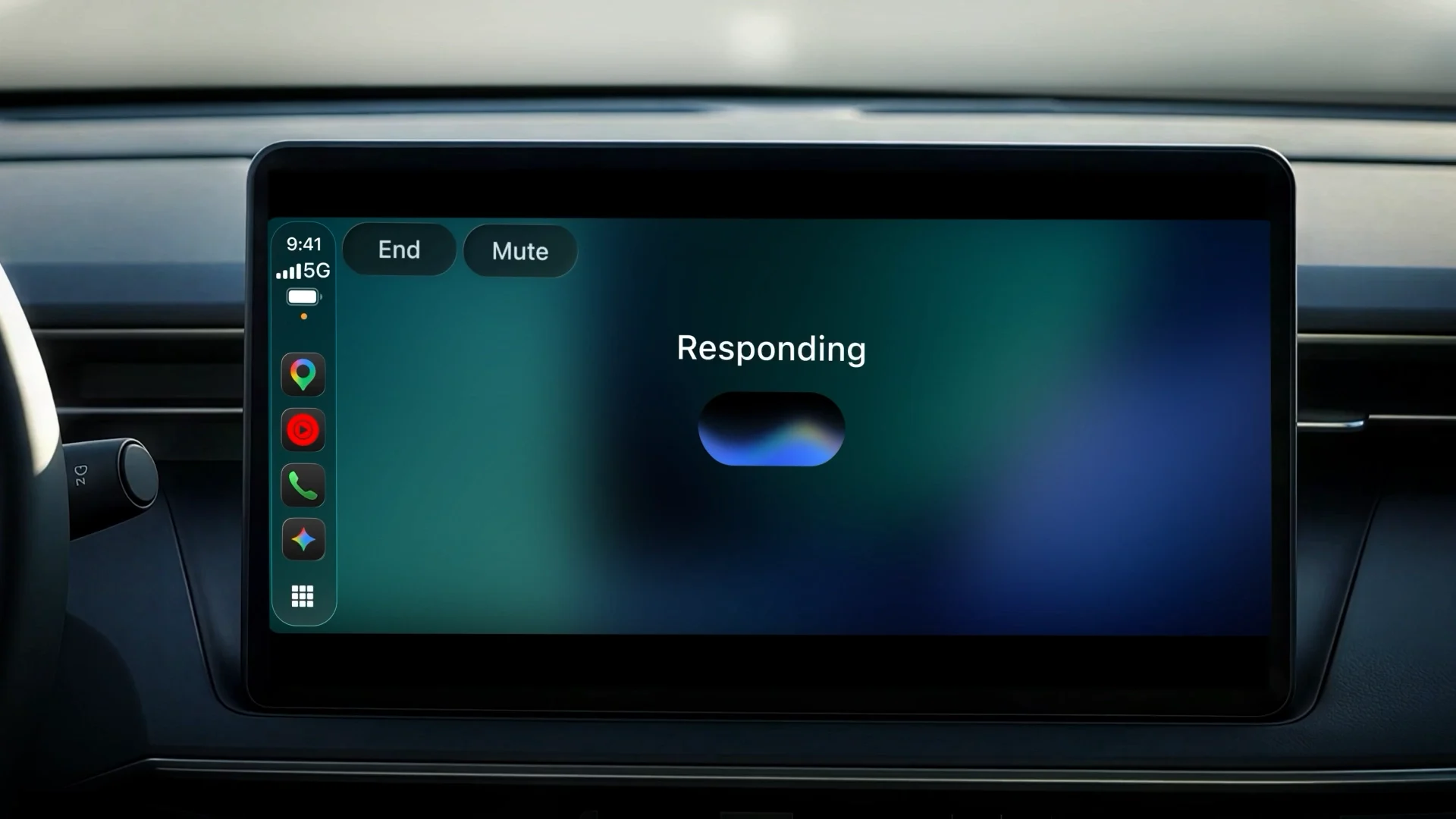
Google has begun the global rollout of a dedicated Gemini app for Apple CarPlay, bringing Gemini Live conversations to compatible iPhone-and-car combinations. The app can resume recent chats, start new ones and connect to services such as Gmail and Google Calendar when the user grants the required access.
This is not a replacement for Siri or a new layer of vehicle control. Google's published setup starts with the driver tapping the Gemini icon on the CarPlay display or side rail. Once open, the conversation is voice-led: users can interrupt an answer, add information, change subject or pause while concentrating on the road.
Setup begins on the iPhone
Three prerequisites appear in Google's instructions. The iPhone needs the latest Gemini app, microphone permission must be enabled, and Gemini Live must have been used on the phone at least once. After the phone reconnects to CarPlay, the Gemini icon should become available for a new or existing conversation.
The rollout started on 11 November 2026 and covers Gemini users on iOS in every supported Gemini Live language. “Global” does not mean every account receives an identical feature set. Language availability, account type, connected Google services and regional restrictions still apply, while a staged release may mean the icon does not appear for every user at the same moment.
Apple formally supports voice-based conversational apps as a CarPlay category. Its developer rules require voice to be the primary mode once such an app is launched, and advise developers against returning distracting text or imagery while the car is moving. Gemini uses that app framework; it does not gain direct authority over the vehicle by appearing on its display.
What the CarPlay app can do
Google presents Gemini on CarPlay as a continuation of the iPhone experience. Conversations are synchronised with the Gemini app, so a summary, idea or rehearsal created on the road remains in chat history after the driver parks. A recent conversation can also be resumed from the dashboard rather than started again.
When relevant Google Workspace connections are enabled, a user can ask about Calendar events, request an email-thread summary or talk through a draft reply. Google also demonstrates local recommendations, background on landmarks, presentation practice and explanations of technical subjects. The conversational format allows follow-up questions without repeating all the context.
Those examples depend on permission and data access. Installing the app does not automatically open Gmail or Calendar to Gemini. The user must connect the services, and an organisation-managed Workspace account may impose its own restrictions. Without those connections, general Gemini Live conversations can still work, but personalised answers will have less private context.
Daily Brief is not available everywhere
Google's launch article carries a material regional footnote. Daily Brief and certain personalisation features are unavailable to users under 18, in the European Economic Area and in Nigeria. A driver in an EEA country can receive the CarPlay app while still being unable to use one of the headline examples shown in the global announcement.
That distinction affects Romania, France, Germany, Italy and Spain, among other markets covered by the European Economic Area rules. The basic CarPlay release and supported Gemini Live languages are separate from the availability of Daily Brief. Users should inspect the extensions and personalisation controls in their own Gemini account rather than treating the launch demonstration as a universal menu.
The October rollout of Personal Intelligence on Android Auto has a different regional and account eligibility note. It should not be used as evidence that the same personalisation layer is active in CarPlay. Google's CarPlay post specifically names Workspace connections and places the Daily Brief limitation in its own footnote.
It does not control the car
CarPlay projects approved iPhone apps into a driving-focused interface. Google does not claim that the Gemini app can change cabin temperature, operate locks, alter driver-assistance settings or read the vehicle's diagnostic data. Those capabilities would require cooperation with the manufacturer and access through the car's native software.
This makes Gemini on CarPlay different from Gemini in cars with Google built-in. In Google built-in vehicles, Google services run in the native infotainment system and the available car controls depend on the automaker's implementation. On CarPlay, the iPhone supplies the app, account, microphone access and data connection.
The same boundary applies to navigation. Gemini can discuss a destination or suggest a nearby place, but Google has not described this standalone app as a replacement for a compatible navigation application. The route and turn-by-turn interface remain the responsibility of Maps or another CarPlay navigation app.
The first action is still a screen tap
Google's own instructions tell the user to tap the Gemini icon before speaking. The announcement does not state that Gemini becomes the system-level wake-word assistant, takes over the steering-wheel voice button or runs continuously in the background. Describing the experience as hands-free is accurate after launch, but not as a claim that no initial screen interaction is required.
The app is designed so the driver can interrupt Gemini and pause for an exit or difficult traffic situation. That is useful, although a long conversation can still compete for attention. Apple's rules for conversational apps emphasise voice-first interaction precisely because reading extensive text is unsuitable while driving.
Google also labels generative AI as experimental. Responses can be incomplete or wrong, particularly when they depend on current opening hours, road conditions or information extracted from a long email thread. Safety-critical instructions, vehicle warnings and navigation alerts should come from the relevant car or navigation system rather than a general AI conversation.
For drivers who already use Gemini on an iPhone, the new app removes the need to handle the phone and provides a CarPlay-sized interface. Its practical value will depend less on the icon itself than on language support, the services a user is willing to connect and the regional limits attached to personal data features.